Restaurant Feedback Form Template

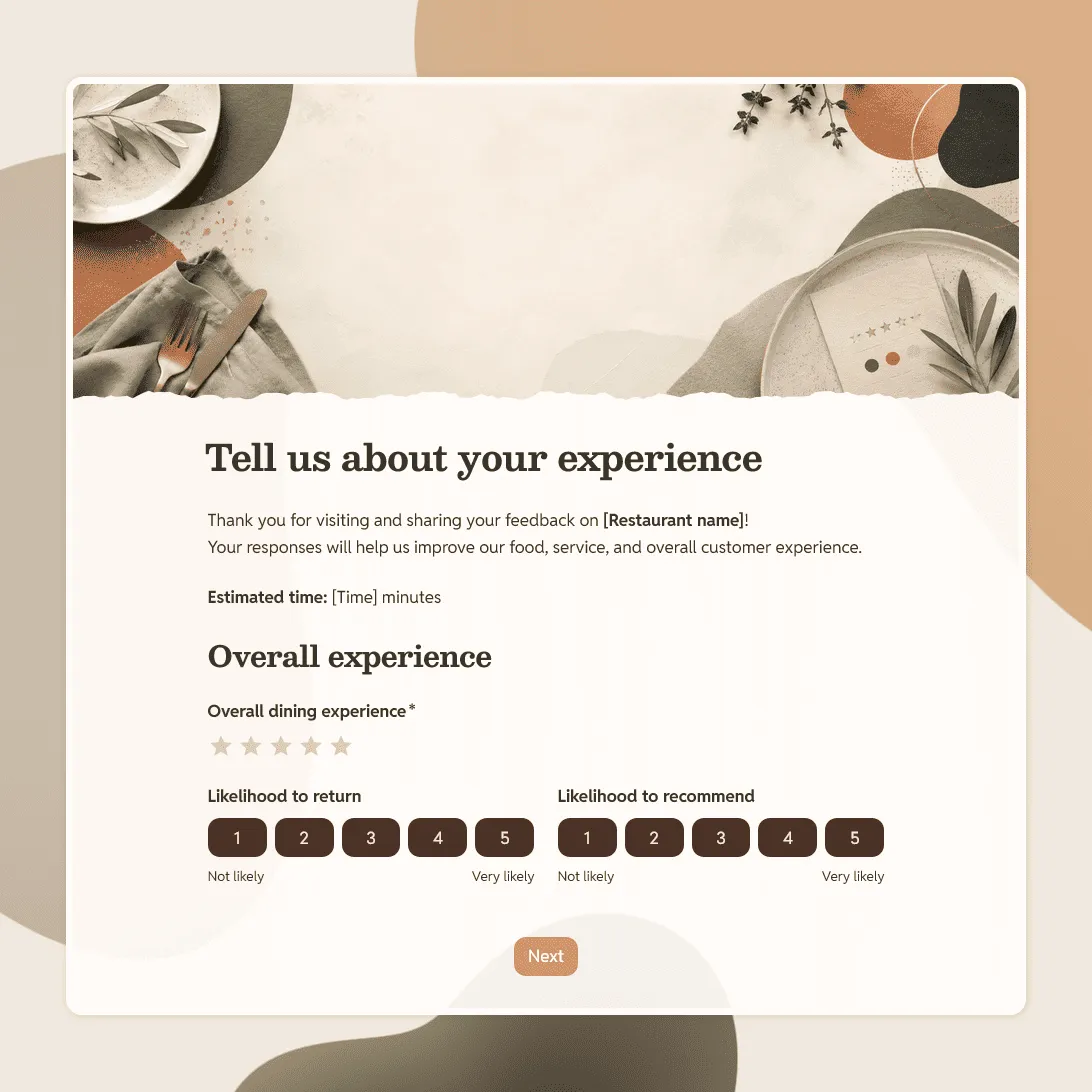
Free restaurant feedback form template for collecting guest feedback about food, service, atmosphere, and the overall dining experience.
Use this template
No signup required / Free unlimited responses
Restaurant Feedback Form Template

Need a custom restaurant feedback form?

Describe your restaurant and FormGrid will generate a tailored feedback form for you.

About this restaurant feedback form template

Use this restaurant feedback form template to collect honest guest feedback after a meal, order, event, or visit.

It works for restaurants, cafes, bars, bakeries, food trucks, catering businesses, hotel restaurants, pop-ups, and private dining experiences. You can share the form by QR code, receipt link, follow-up email, table card, website embed, or social media.

The template covers the parts of the guest experience that usually matter most: food, service, timing, atmosphere, cleanliness, value, and whether the guest would return or recommend the restaurant.

What this template includes

This restaurant feedback form template includes questions about:

  • Overall dining experience
  • Food quality and taste
  • Menu variety and options
  • Service and staff friendliness
  • Wait time and speed of service
  • Atmosphere and comfort
  • Cleanliness
  • Value for money
  • Favorite dish or drink
  • Suggestions for improvement
  • Likelihood to return
  • Likelihood to recommend
  • Optional name and contact details for follow-up

You can keep the form short for quick table-side feedback, or add more detail for special events, catering jobs, private dining, or customer recovery.

How to use this template

Click “Use this template” to open the restaurant feedback form in FormGrid.

  1. Add your restaurant details. Update the title, intro text, restaurant name, location, and any short note you want guests to read before answering.
  2. Review the rating questions. Keep the ratings that match your goals, such as food quality, service, wait time, cleanliness, atmosphere, and value.
  3. Adjust the open-ended questions. Ask what guests enjoyed, what could be improved, and whether anything affected their experience.
  4. Add visit details if needed. You can ask for visit date, meal type, order type, table number, server name, or location if those details help you review the feedback.
  5. Decide whether contact details should be optional. Optional contact fields make it easier for guests to leave honest feedback while still giving unhappy guests a way to request follow-up.
  6. Use conditional questions for low ratings. With conditional logic, you can show a follow-up question when someone gives a low score.
  7. Update the confirmation message. Thank guests for their feedback and explain whether someone may follow up.
  8. Publish and share the form. Copy the link after publishing, or add it to your website with an embed code.

Responses appear in your response table, where you can review ratings, comments, and guest contact details. You can also export responses when you need a spreadsheet for staff meetings, menu planning, or monthly reporting.

Tips for collecting better restaurant feedback

A restaurant feedback form should be quick for guests to complete and specific enough for your team to act on.

  • Keep the form short for QR codes. If guests scan the form at the table or from a receipt, focus on the essentials: food, service, atmosphere, overall rating, and one open comment field.

  • Ask about the visit context. Visit date, location, meal period, order type, or table number can make feedback easier to understand without asking guests to write a long explanation.

  • Use follow-up questions for poor experiences. If someone rates the experience poorly, ask what went wrong and whether they want to be contacted. This helps with service recovery.

  • Leave room for specific praise. A simple “What did you enjoy most?” question can surface popular dishes, standout staff moments, and details you may want to reuse in training or marketing.

  • Review feedback regularly. Look for repeated comments about wait time, menu items, cleanliness, pricing, staff, or atmosphere. One comment may be a one-off. A pattern needs attention.

Need help with the full setup? See how to create a feedback form for planning, questions, testing, publishing, and sharing.

Restaurant feedback form FAQs

What should a restaurant feedback form ask?

A restaurant feedback form usually asks about the overall experience, food quality, service, wait time, atmosphere, cleanliness, value, and whether the guest would return or recommend the restaurant. Add an open comment field so guests can explain their rating.

Can I use this form with a QR code?

Yes. Publish the form, copy the link, and paste it into a QR code generator. You can place the QR code on receipts, table cards, menus, posters, takeaway bags, or follow-up emails.

Can I ask different questions for dine-in, takeaway, and delivery?

Yes. Use conditional logic to show different questions based on the order type. Dine-in guests can answer questions about service and atmosphere, while delivery or takeaway guests can answer questions about packaging, pickup, timing, and food condition.

Should restaurant feedback be anonymous?

Anonymous feedback can make guests more comfortable sharing honest comments. Keep name and contact fields optional if you want both honest feedback and a way to follow up when a guest wants a response.

Can I get notified when someone submits feedback?

Yes. Turn on email notifications to receive each new response in your inbox. This is especially useful for low ratings, complaints, or feedback that needs a quick follow-up.

Can I embed the restaurant feedback form on my website?

Yes. After publishing, you can add the form to your website with an embed code, or share the form link directly.

How do I review the responses?

Use the response table to review ratings, comments, visit details, and contact information. You can also export responses to CSV or Excel for reporting, staff discussions, or trend analysis.

Is this restaurant feedback form template free?

Yes. The template is free to use, and you can collect unlimited restaurant feedback responses on the free plan.