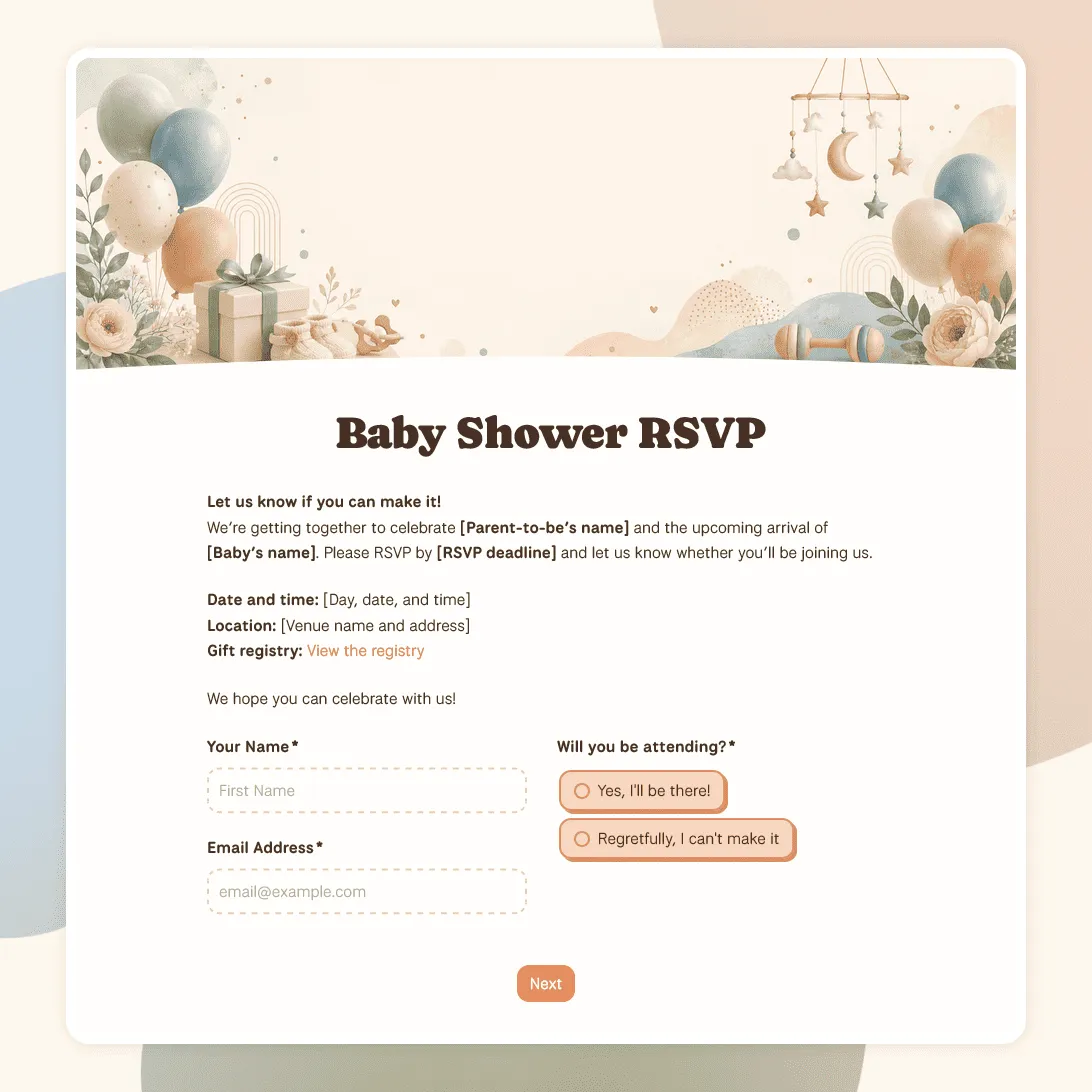
Baby Shower RSVP Template

Free baby shower RSVP template for collecting guest replies, guest counts, meal notes, gift details, and messages for the parents-to-be.
Use this template
No signup required / Free unlimited responses
Baby Shower RSVP Template

Need a custom baby shower RSVP form?

Describe the baby shower and FormGrid will generate a custom RSVP form you can edit and share.

About this baby shower RSVP template

Use this baby shower RSVP template to create a simple online invitation page with RSVP questions built in. Add the shower details, include a registry note, collect guest replies, and share one RSVP link with everyone you invite.

It works for baby showers, gender reveals, family brunches, and virtual celebrations. Guests can open the link from their phone, see the event details, and respond online.

You can create free online baby shower invitations with RSVP in FormGrid without using a separate invitation platform.

What this template includes

This baby shower RSVP form template includes the essentials for planning the guest list:

  • Guest name and contact details
  • Attendance response
  • Guest count and plus-one details
  • Meal choice or dietary notes
  • Accessibility needs
  • Song, activity, or party request
  • Optional message to the host
  • RSVP confirmation message

You can keep it short for a casual shower, or add extra questions for games, meal planning, virtual attendance, or family groups.

How to use this baby shower RSVP form template

Click “Use this template” to open the baby shower RSVP template in FormGrid.

  1. Add the invitation details. Include the parents’ names, host name, date, time, location, RSVP deadline, and a short welcome note.
  2. Add registry or gift information. Include a registry link, diaper raffle note, book request, or “no gifts” message if needed.
  3. Update the RSVP question. Keep it simple with “Yes” and “No”, or add options like “Maybe”, “Joining virtually”, or “Stopping by later”.
  4. Review the guest count field. Keep it if guests can bring a partner, child, or family member. Remove it if each invitation is for one named guest.
  5. Adjust food questions. Keep dietary notes or meal choices only if you are planning food around the replies.
  6. Add a personal question. Baby predictions, advice for the parents, song requests, or a message for the family can make the RSVP feel more personal.
  7. Publish the page. After publishing, copy the RSVP link for the baby shower.
  8. Share the RSVP link. Send it by text, email, group chat, or online invitation. You can also turn it into a QR code for printed invitations.

Responses appear in the response table, where you can review the guest list, attendance replies, guest counts, and notes. You can also export responses when you need a spreadsheet for planning.

Baby shower RSVP template FAQs

Can I make a free baby shower RSVP website in FormGrid?

Yes. Your published FormGrid form has its own shareable page, so you can use it as a free RSVP website for your baby shower. Add the shower details, registry note, RSVP questions, and confirmation message in one place.

Open the template, update the shower details, then publish the form. After publishing, copy the RSVP link and send it to guests by text, email, group chat, or online invitation.

Yes. Add a gift registry link, diaper raffle note, book request, or gift preference to the intro text, a separate text block, or the confirmation message.

Can I use this for a virtual baby shower?

Yes. Replace the location with your online event details. You can use the confirmation message to explain when guests will receive the video link or joining instructions.

Can I add a QR code to printed baby shower invitations?

Yes. Publish the form, copy the RSVP link, and paste it into a QR code generator. Add the QR code to printed invitations, cards, signs, or table displays.

How do I track baby shower RSVPs?

Use the response table to see who is coming, who declined, guest counts, dietary notes, and messages. Turn on email notifications if you want each new RSVP sent to your inbox. You can also export responses to CSV or Excel when you need a spreadsheet.

Is this baby shower RSVP template free?

Yes. The template is free to use, and you can collect unlimited baby shower RSVPs on the free plan.