Volunteer Application Form Template

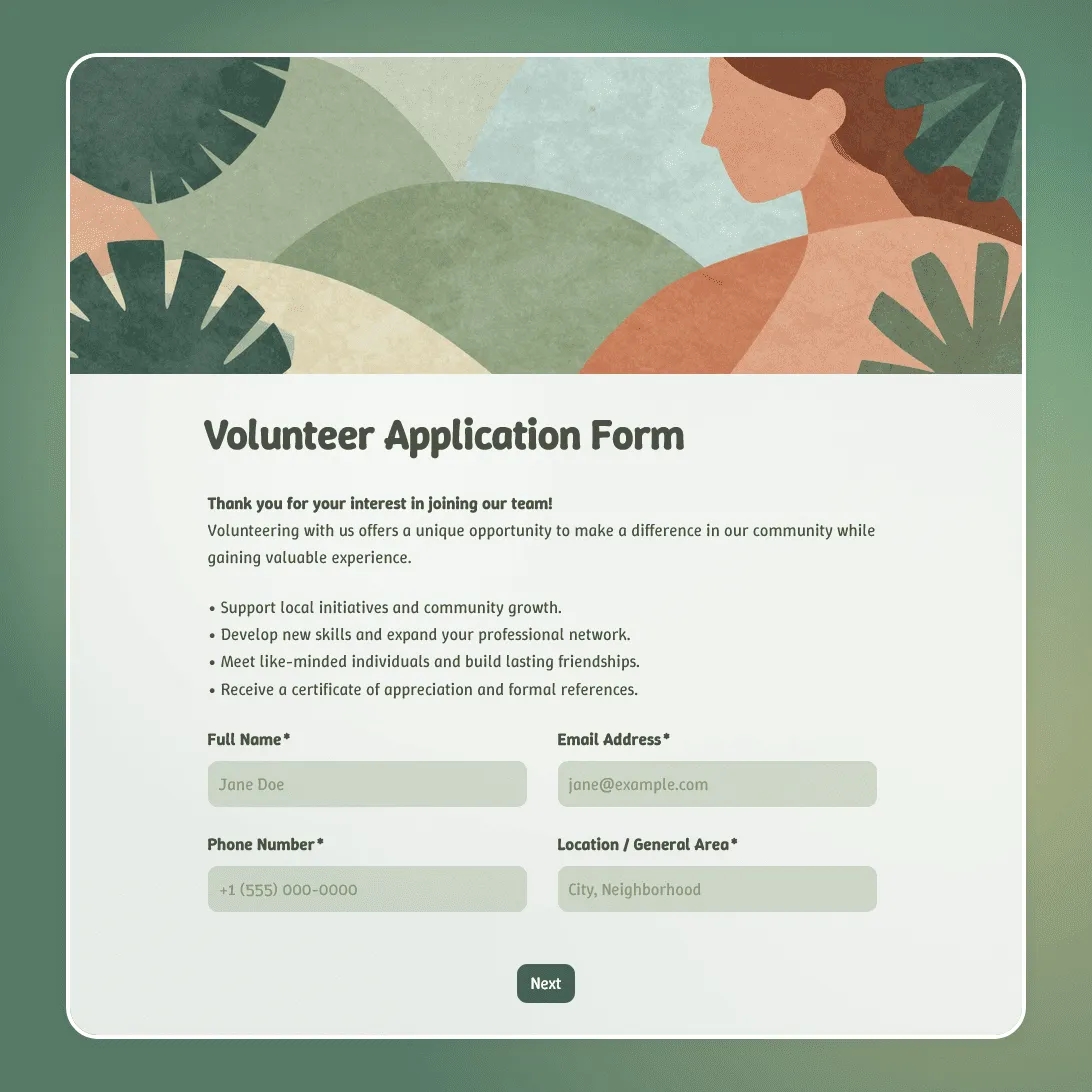
Free volunteer application form template for nonprofits, events, and community organizations. Collect skills, availability, and contact details.
Use this template
No signup required / Free unlimited responses
Volunteer Application Form Template

Need a custom volunteer application form?

Describe your organization and FormGrid will generate a tailored volunteer application form for you.

About this volunteer application form template

Recruiting volunteers works best when the process respects their enthusiasm. If someone is motivated enough to offer their time, a confusing or overly long application will send them somewhere else. This volunteer application form template gives you a clean, welcoming way to collect the information you actually need, without making it feel like a job application.

Whether you are building a volunteer base for a nonprofit, a one-day community event, an ongoing charity program, or a seasonal festival, this template helps you gather contact details, availability, relevant skills, and any role-specific information in a single step.

What is a volunteer application form?

A volunteer application form is a questionnaire used to recruit and screen unpaid helpers. The purpose is not just to collect names and emails but to understand whether an applicant is a good match for the specific roles you have available and to give them the right information before they commit.

A well-designed form collects:

  • Contact details: So you can reach them before, during, and after the event or program.
  • Skills and interests: To match volunteers to tasks they are actually good at and motivated by, rather than assigning roles randomly.
  • Availability: When can they come, how many hours can they commit, and do they have any constraints?
  • Emergency contact: Essential if your volunteering involves physical activity, outdoor work, or working with vulnerable groups.
  • Compliance acknowledgment: Background checks, waivers, or code of conduct agreements that need to be accepted before the process moves forward.

Volunteer application form questions

This template strikes a balance between collecting necessary information and keeping the form quick enough to complete. Here is what it includes:

Personal information

  • Full name, email address, and phone number.
  • Location or general area (useful for community-based programs or local events).
  • Emergency contact name and phone number.

Skills and experience

  • “Why do you want to volunteer with us?” (open text)
  • Areas of interest or relevant skills (for example: event setup, administration, social media, working with children, first aid).
  • Any previous volunteering experience and a brief description.

Availability

  • Preferred days of the week and times (mornings, afternoons, evenings or weekends).
  • How many hours per week or month they are able to commit.
  • Whether they are available immediately or from a specific start date.

Logistics and compliance

  • Any physical limitations or required accommodations.
  • Agreement to volunteer guidelines, liability waiver, or background check requirements (if applicable).

Volunteer application form FAQs

What is the difference between a volunteer application form and a volunteer registration form?

A volunteer application form is used to evaluate and select candidates before they are accepted. It may ask screening questions to ensure the person is a good fit for the role. A registration form is used after someone has already been accepted, to collect logistics details for a specific event or shift. If you are still deciding who gets a spot, that is an application.

How do I match volunteers to the right roles?

Include a section on skills and interests in the application form, and ask applicants to select or describe the kind of work they want to do. When reviewing submissions from your FormGrid dashboard, you can filter and sort responses to find applicants who listed the skills your highest-priority roles require.

How do I notify applicants once I have reviewed their form?

Once you decide to accept a volunteer, you can follow up directly using the email address they provided in the form. FormGrid shows you all submissions in one dashboard, so you can quickly identify who is accepted and reach out to confirm their placement, send onboarding materials, or share a schedule.

Can I use this form for recurring volunteer programs, not just one-time events?

Yes. You can keep the same form live year-round on your website or share the link in social media posts whenever you are actively recruiting. You can also duplicate the form to create tailored versions for different roles, programs, or time periods.

Should I ask for a background check through the form?

You can include a question asking applicants to acknowledge that a background check may be required, and a checkbox for them to consent to being contacted for that purpose. The actual background check would be handled outside the form through your usual process.

What if I get more applications than I have positions for?

That is a good problem to have. Review all submissions in your FormGrid dashboard, sort by the skills and availability most relevant to your open roles, and select your best matches. You can reach out to unselected applicants to explain that positions are full and invite them to apply again in the future.

Is this volunteer application form template free?

Yes. This template and FormGrid’s core features are completely free. You can collect unlimited applications and create as many forms as you need at no cost.